tuvalindëtoo-vah-LIN-deh
Music that learns you.
Press one gold button and a song you want right now starts playing. How it knows is the part we keep to ourselves.
Free. No ads, no account. iPhone with iOS 26.1 or later and an Apple Music subscription.
Press JUMP IN.
The home screen is almost empty: a wordmark, a search button, the time of day and the day of the week, and one gold button.
Press it and you choose nothing. No mood to pick, no playlist to build. tuvalindë picks the first song and keeps going. Your part is to listen, or skip.
Give it some listening and Jump In starts to fit the hour, and whether it's a weekday or the weekend. A Thursday morning stops sounding like a Saturday night.
There is an engine under that button.
tuvalindë sits on top of Apple Music, but the picks are its own. They come from an engine built slowly, by people who care too much about which song comes next.
You can't get this by bolting a playlist generator onto a catalog.
Five artists, then music.
No account to create. Allow Apple Music access, pick five to ten artists you love, and setup is done. It also reads what you already play, so it doesn't start from zero.
From then on it learns from what you finish and what you skip. A skip means not right now. Nothing is ever banned for good.
Allow Apple Music access.
Pick five to ten artists you love.
Press JUMP IN.
Steer it when you want to.
Inspired Picks
The algorithm will learn you, and will feed you picks inspired by your activity and habits.
Switch the Vibe
Tap the wand and the music goes in a different direction, but somehow one that is still yours.
Search
Songs, Artists and Albums. Give it a song that's in your head and we take it from there. One Song. Glory.
Album Mode
Remember when we used to listen to whole albums? Yep. That's here too.
Top Listens & More
Feeling like you want to stay in your bubble? Check out your top listens and start there.
Lyrics
What music app would be complete without a quick look at lyrics when needed. That's here too.
It drives well.
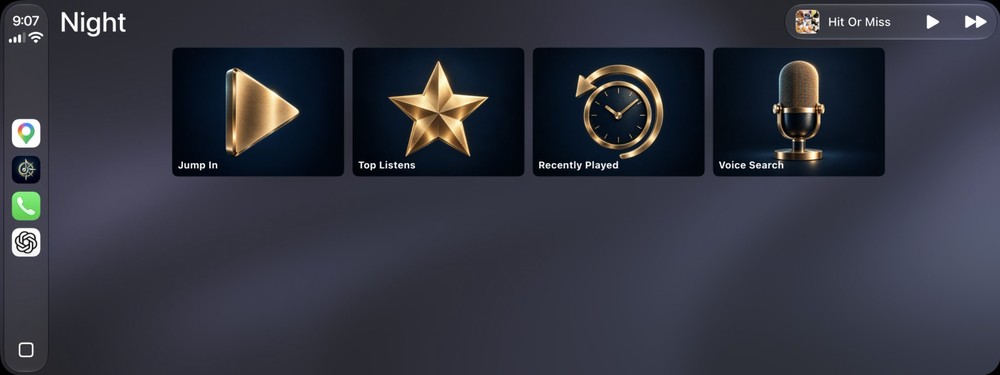
Four tiles on the car screen: Jump In, Top Listens, Recently Played and Voice Search. One tap on Jump In and the drive has music. Tap Voice Search and say an artist, a song or an album. Album and track lists are there too, and you can Switch the vibe from the car.
A portrait of how you listen.
Listen for a while and tuvalindë draws you. It opens with a three-word headline for the listener you are, something like Weeknight Punk Loyalist. Beneath it sits a gold helix of your last 30 days, then four tiles for Songs, Listening Time, Completion Rate and Artists.
Weeknight Punk Loyalist
Your Universe
A star map of your artists. They gather into glowing clouds, and each cloud carries a scene name a fan would use.
Inner Circle
Your top ten artists as portraits, sized by how much you play them.
On Repeat
The five songs you finish most.
Rhythm
Your week as a grid, morning to night, with the genre that leads each part of it.
Nothing inside it is for sale.
It needs an active Apple Music subscription, and it leaves your library exactly as it found it.
Kept on your phone.
Your listening history and taste profile are kept on your phone. There are no ads, no trackers and no analytics SDKs. The full detail is in the Privacy Policy.
Turn off Allow Explicit and explicit songs are blocked everywhere. Clear All Data erases everything the app has learned about you.
Press the button.
On the App Store for iPhone with iOS 26.1 or later. It also runs on iPad, using the phone layout, and in the car with CarPlay.